

DELL 210-BTHF WD25TB4 Pro Thunderbot 4 Docking Station
| Location | Availability |
|---|---|
Online (Delivery) | Available from Supplier (2 to 7 Working Days) |
Notting Hill (Pickup) | Available from Supplier (2 to 7 Working Days) |
Preston (Pickup) | Available from Supplier (2 to 7 Working Days) |
West Melbourne (Pickup) | Available from Supplier (2 to 7 Working Days) |
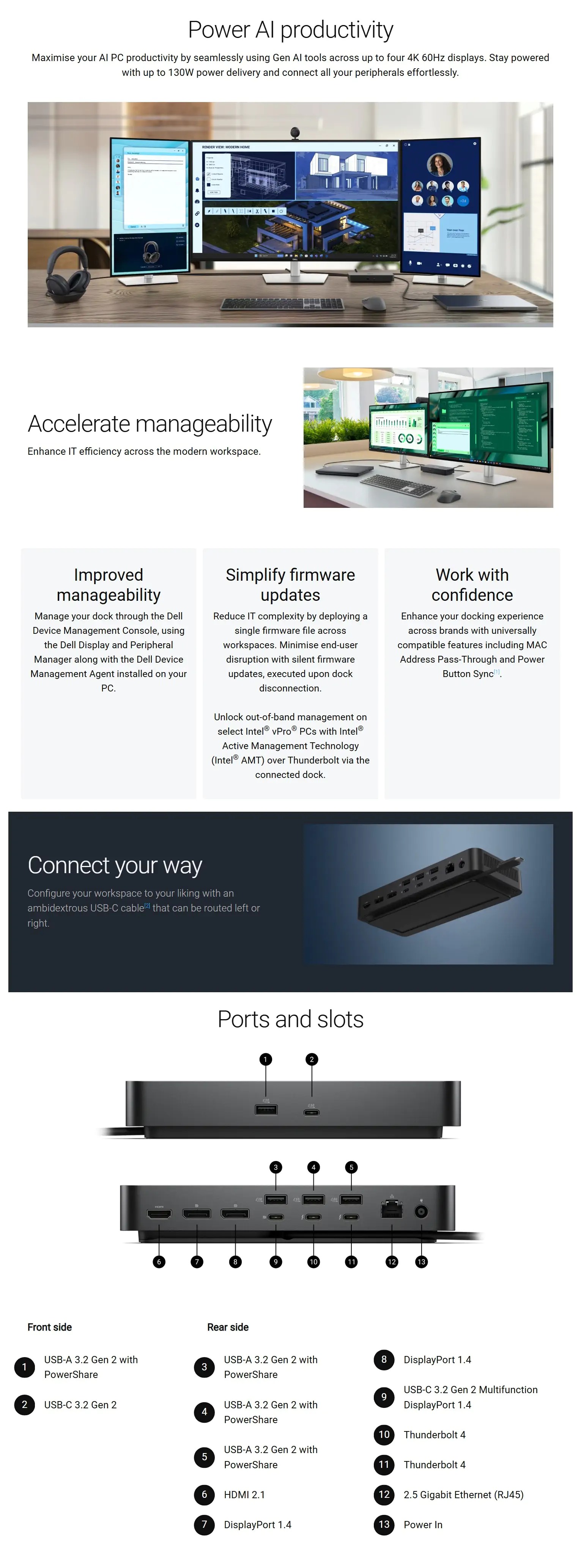
SPECIFICATIONS
|
Connectivity Technology |
Wired |
|
Device Supported |
Notebook Desktop PC |
|
Cable Length |
83 cm |
|
Features |
Power Delivery Pass-through LED Power Indicator Indicator Light |
|
Management Features |
Intel AMT over Thunderbolt with select Intel vPro PCs MAC Address Pass-through PXE Boot Dock Power Button Sync Wake-on-LAN WLAN to LAN Switch Kernel Direct Memory Access (DMA) Protection Dell Command Update (DCU) Port Disablement Host PC based firmware update Firmware update on disconnect |
|
Number of Displays Supported |
4 |
|
Screen Mode Supported |
QHD @ 60Hz WQHD @ 60Hz 4K @ 60Hz 5K @ 60Hz 6K @ 60Hz 8K @ 60Hz |
|
Supported Resolutions |
3840 x 2160 5120 x 2160 2560 x 1440 3440 x 1440 7680 x 4320 6144 x 3456 |
|
Maximum Data Transfer Rate |
1.25 GB/s |
|
Security Slot Type |
Kensington Security Slot Noble Wedge Security Slot |
|
Power Delivery Details |
4 x USB-A 3.2 Gen 2 (4.5W each) 1 x USB-C 3.2 Gen 2 (15W) 1 x USB-C Multi-function DisplayPort (7.5W) 2 x Thunderbolt 4 (15W each) All deliver power with or without PC |
|
Power Delivery |
130W (Dell Systems) 96W (non-Dell Systems) |
|
Video Resolution Details |
QHD - 60 Hz (Quad Display) WQHD - 60 Hz (Triple Display) 4K - 60 Hz (Dual Display) 5K - 60 Hz (Single Display) 4K - 60 Hz (Quad Display) 4K - 60 Hz (Triple Display) 6K - 60 Hz (Dual Display) 8K - 60 Hz (Single Display) |
|
Ethernet Technology |
2.5 Gigabit Ethernet |
|
Host Interface |
Video interfaces: 2 x DP 1.4 1 x HDMI 2.1 1 x USB-C 3.2 Gen 2 Multi-function DisplayPort 1.4 2 x Thunderbolt 4
USB Ports (Data Only): 4 x USB-A 3.2 Gen 2 (10 Gbps) 1 x USB-C 3.2 Gen 2 (10 Gbps) |
|
Total Number of USB Ports |
6 |
|
USB Type-A |
Yes |
|
Number of USB 3.2 Gen 2 Type-A Ports |
4 |
|
Number of USB 3.2 Gen 2 Type-C Ports |
1 |
|
Number of USB Type-A Ports |
4 |
|
USB Type-C |
Yes |
|
USB Type-C Detail |
1 x USB-C 3.2 Gen 2 (10 Gbps), (15W), 1 x USB-C 3.2 Gen 2 Multi-function DisplayPort 1.4 |
|
Number of USB Type-C Ports |
2 |
|
Network (RJ-45) |
Yes |
|
DisplayPort |
Yes |
|
Number of DisplayPorts |
2 |
|
DisplayPort Version |
1.4 |
|
HDMI |
Yes |
|
Number of HDMI Ports |
1 |
|
HDMI Version |
2.1 |
|
Thunderbolt |
Yes |
|
Thunderbolt Ports Quantity |
2 |
|
Number of Thunderbolt 4 Ports |
2 |
|
Interfaces |
2 x DP1.4 1 x HDMI 2.1 1 x USB-C 3.2 Gen 2 Multi-function DisplayPort 1.4 2 x Thunderbolt 4 |
|
Host Software |
Host Software (Windows): Dell Firmware Utility Dell Display and Peripheral Manager Dell Command Update
Cloud Management (via host PC software) Dell Device Management Console enables: Automatic firmware updates Maintain specific firmware version or downgrade Peripheral inventory and status |
|
Operating System Supported |
Windows 10 Windows 11 Ubuntu 24.04 macOS ChromeOS 137 Red Hat Enterprise Linux 9.6 |
|
Maximum Power Supply Wattage |
180 W |
|
Power Source Type |
Power Adapter |
|
Height |
205 mm |
|
Width |
90 mm |
|
Depth |
35.3 mm |
|
Weight (Approximate) |
567 g |
|
Package Contents |
Pro Dock WD25TB4 Docking Station Power Adapter Power Cord Documentation (Quick Start Guide, Safety, Environmental, and Regulatory Information) |
|
Kensington Security Slot |
Yes |
| GTIN | 5397184854587 |
|---|