
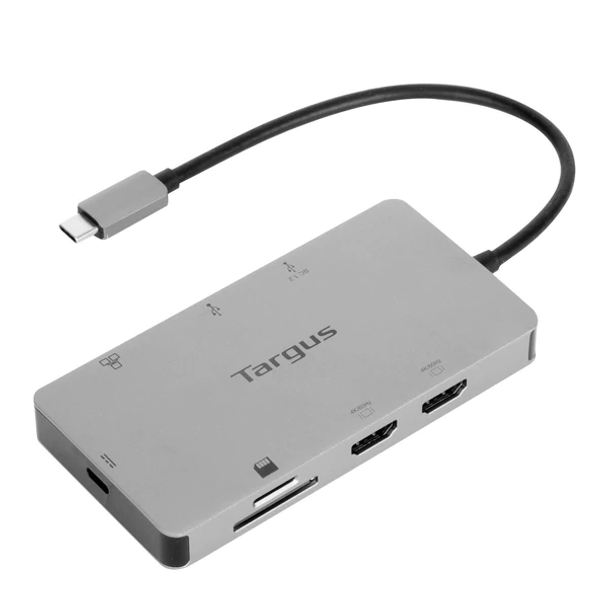
Targus DOCK423AU USB-C Dual HDMI 4K Docking Station with 100W Power Delivery Pass-Thru
| Location | Availability |
|---|---|
Online (Delivery) | End of Life |
Notting Hill (Pickup) | End of Life |
Preston (Pickup) | End of Life |
West Melbourne (Pickup) | End of Life |
Turn your laptop into a dual video workstation with the compact USB-C Alt. Mode Dual HDMI 4K Docking Station with 100W PD Pass-Thru. Connect your USB-C-enabled devices to two HDMI monitors, while also connecting to a Gigabit Ethernet network, and plugging in your key peripherals — like mice, keyboards, flash drives, or hard drives — into the USB-A ports.
Plus, access your data with the SD and Micro SD card reader/writer. You can even keep your laptop charged and powered by connecting the laptop USB-C power adapter to the USB-C port on the dock. This dock also provides transfer speeds up to 5Gbps per port. It supports up to 100W (20V/5A) charging max. Compact and lightweight, it’s easy to take it along with you anywhere you go.
4K UHD Display
Whether you want to run a presentation on a larger display or use an external display, this dual video docking station supports HDMI displays up to 4K.
Connectivity Made Simple
Enhance your productivity and connect to more with 2 USB-A 3.2 Gen 1 ports (1 fast-charging).
Charge and Power Host Device
With up to 100W Power Delivery pass-thru, this dock allows you to power and charge your USB-C laptop or host simply by connecting the laptop’s power adapter into the USB-C port. Great for laptops with only one USB-C port.
Perfectly Portable
Slim and light, this dock is perfect for the home, office, or anywhere in between. Great for mobile workers or those in hoteling or hot desking environments.
Plug and Play Simplicity
With no need for additional software, this adapter easily attaches to your USB-C Alt. Mode (including Thunderbolt™ 3) host device (i.e., laptop) to help you connect to a wired network, more peripherals, and transfer data.
Specifications
- Connection Technology
Multi-Function DisplayPort™ Alt-Mode
- Host Port Compatibility
USB-C, DP Alt Mode, TB3 Compatible
- Works With
Windows, macOS, iPadOS, Chrome OS, Linux, DeX
- Ethernet
Yes
- Max Host Power
100W
- Power Source
Pass-thru
- HDMI
2
- DisplayPort
0
- Mini DisplayPort
0
- VGA
0
- DVI-D
0
- DVI-I
0
- Total USB-A Ports
2
- Fast Charging Ports
1
- USB-C Ports / 3.2 Gen 2
1 (pass-thru only)
- Thunderbolt Ports
0
- Audio Ports
0
- SD/Micro SD
1 of each
- Lock Slot Compatibility
N/A
- Colour
Silver
- Dimensions
15 x 10 x 3 cm
- Weight
0.13 kg
- Warranty
Limited 2-Year Warranty
The DOCK423 is a USB-C DisplayPort Multi-Function (DPMF) device. It will function when plugged into any compatible USB-C Alternate Mode (Alt. Mode) host receptacle (including Thunderbolt).
Supported platforms include Windows® PC, MacBook®, iPad Pro®, Linux® PC, Samsung® DeX, Chromebook™, and Android™ tablets and smartphones.
PLATFORM COMPATIBILITY
The DOCK423 has been validated with the current releases of the following:
- Windows 10 PC with USB-C Alternate Mode Ports
- MacBooks Mojave, Catalina, and BigSur macOS™, including M1 with Thunderbolt Ports
- Chromebooks with USB-C
- Linux platforms supporting Type-C Alternate Mode technologies and Power Delivery
- Android platforms supporting Type-C Alternate Modes
- Samsung DeX Devices with USB-C
- iPad Pro Platforms with USB-C
- Various Embedded and Thin Client OS including HP ThinPro platforms supporting Alt. Mode
While the DOCK423 is compatible with just about every Type-C technology, the only mode the DOCK423 does not function with is regular USB (aka USB 3.0). It cannot be converted to connect to a USB STD-A or Apple Lightning port. Many of the DOCK423 functions and their performance rely on the capabilities of the host it is plugged into. The following describes what can be expected in various configuration use cases utilizing the DOCK423.
DISPLAY MONITOR SUPPORT
The DOCK423 supports rendering up to 4K (3840 x 2160P) 60Hz video via DisplayPort Multi-Stream Transport (MST) on each of its downstream facing HDMI ports.
The DOCK423 supports up to HDR10 color in single 4K and lower dual resolution applications.
DisplayPort Digital Stream Compression and single 8K rendering are not supported.
Dual Display Monitor Support
The DOCK423 supports single mirrored, dual mirrored, dual extended, DeX and iPad Pro external monitor rendering in accordance with the connected host platform capabilities. See the diagram below.
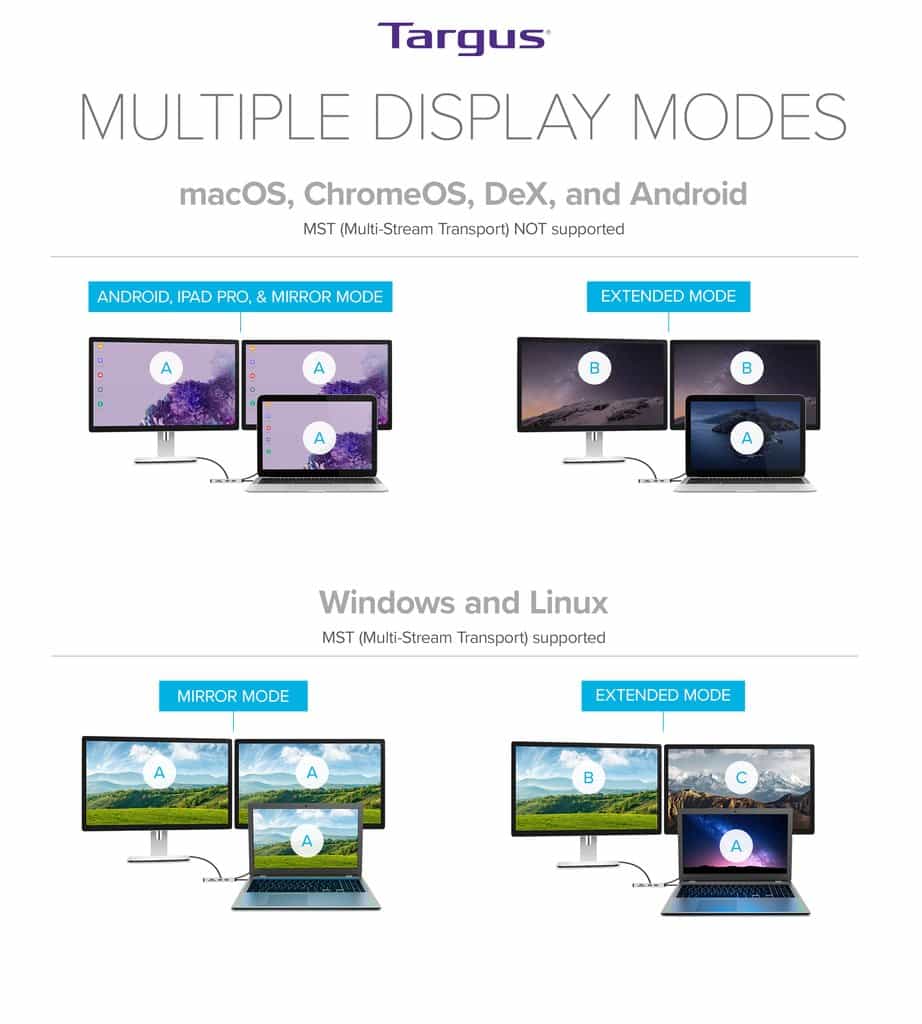
Some graphics adapter implementations may not enable desired Windows dual extended monitor settings. For example, the Qualcomm Graphics Adapter settings in the Surface Pro X will enable the highest performance 4K60Hz rendering on one of the two HDMI ports, but Windows settings for a matching 4K mode may not be available for the second HDMI port.
Dual external extended rendering via DisplayPort Multi-Stream Transport (MST) is not available in MacBooks. When connected to a MacBook dual external monitors will mirror one another using Single-Stream Transport (SST). M1 based MacBooks will render to only one external monitor. Samsung DeX Mode will render the DeX Desktop on a single external monitor.
Power Delivery Pass-Thru
The DOCK423 is capable of Power Delivery Pass-Thru of up to 100WDC for the host when a capable Power Delivery power supply unit (PSU) is connected to its USB-C power input port. A PSU is not included with the DOCK423.
Whenever possible, it is recommended to use an external PSU connection exceeding the power requirements of the host plus 15WDC for the DOCK423. In lieu of such a PSU, many times the PSU including with the host will suffice.
A Windows Billboard or similar message may be displayed when using the PSU that came with the host device in a Power Delivery Pass-Thru application. Similarly, a BIOS POST message may be displayed. These messages can be dismissed or ignored in most cases.
Most PSU included with a host device will enable the functionality of the DOCK423, some performance including host battery charging may be slowed, often imperceptibly. Careful consideration to the use case power needs should be made to allow for the required power budget, if the battery is to be maintained throughout the daily use of its host.
Downstream Port Power
The DOCK423 will consume up to 15WDC of power from an external PSU connection. This power is needed for the DOCK423 to function and supply power to its the downstream facing ports. The 15WDC is adequate to power the GbE port, the HDMI ports, the SD/uSD slots, and includes up to 7.5WDC (5VDC @ 1.5A) on the BC1.2 port and an additional 4.5WDC for the second STD-A USB port.
Bus Powering the DOCK423
When an external PSU is not used, the capability of the DOCK423 to power its downstream facing ports is limited to the supply from its upstream host connection. Most late model USB Power Delivery 2.0 and PD 3.0 host receptacle ports will supply at least 15WDC (5VDC @ 3A) to the DOCK423.
Power Delivery Fast Role Swap
The DOCK423 does support the Fast Role Swap (FRS) feature of the PD 3.0 specification. This enables using the DOCK423 as a host power device initially, and then adding a PSU to power the DOCK423 and host without interrupting the DOCK423 data and video operations. It is also possible to start with a PSU connected to the DOCK423 to power the host, and then disconnected where the host becomes the DOCK423 power source again with no interruption of the DOCK423 data and video operations.
Sometimes the PD 3.0 FRS is not completed fast enough to maintain an active Ethernet connection. While the Ethernet connection may recover, it is not advised to connect/disconnect DOCK423 power during applications where the Ethernet connection must be maintained consistent to the session, e.g. a Microsoft® Teams Video Session.
Samsung Fast Charging
Fast charging is not available when using a Samsung power supply that Power Delivery contracts for 9VDC @ 3A for fast charging at 27WDC. After the DOCK423 reserves 15WDC and the power remaining from the power supply is connected to the Power Delivery Pass-Thru port, it is not enough to fast charge the compatible Samsung device.
| GTIN | 5051794035124 |
|---|